Rebuilding liquid glass for Flutter
In June 2025, four days after Apple announced Liquid Glass, we published liquid_glass_renderer. Today we're releasing 1.0.0-dev.0, the first preview of 1.0. It's a ground-up rewrite, and as far as we know, the most visually accurate and best-performing implementation in Flutter to date.

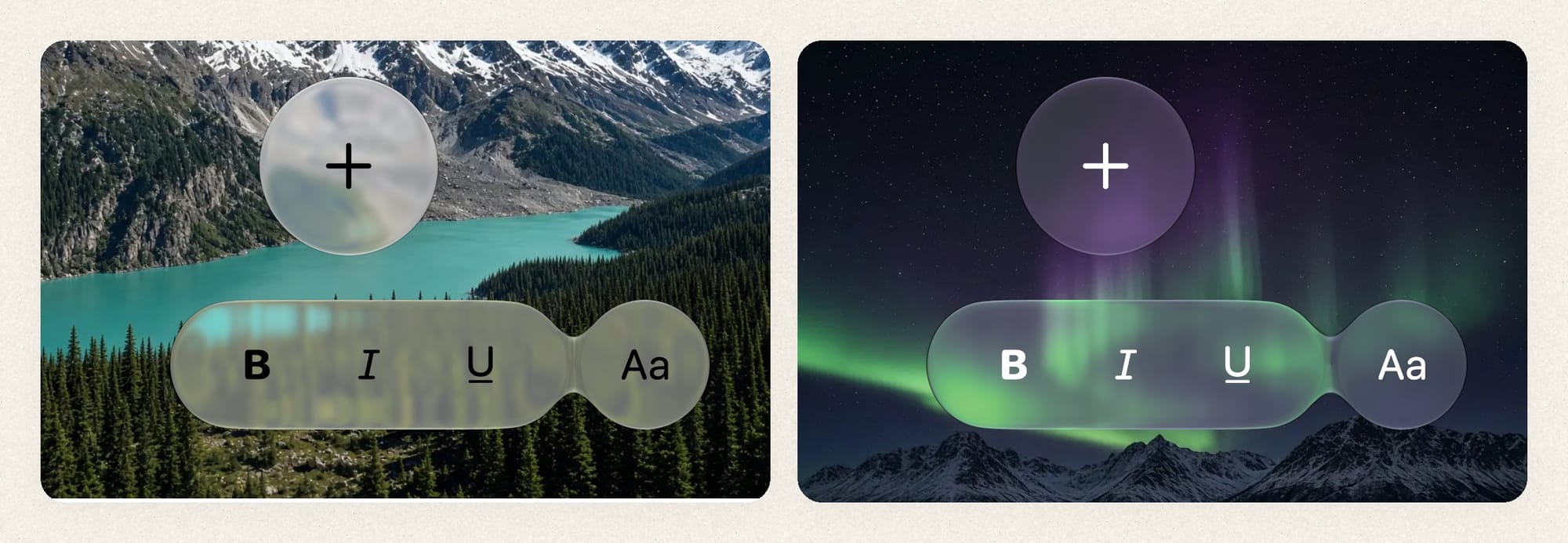
In June 2025, four days after Apple announced Liquid Glass, we published liquid_glass_renderer. It was one of the very first ways to get the effect in Flutter: shader-based refraction, edges that catch the light, and shapes that melt into each other when they get close, all based on widgets you can insert into your tree as you wish. Its ideas spread. liquid_glass_widgets built its rendering pipeline on our code, and the renderer will soon be integrated into cupertino_ui.
But it never quite looked like Apple's glass. It also had a memory problem: stretch a button under your finger and memory went up, and resizing a sheet pushed it higher still. These spikes could get so bad that the OS would kill your app for memory pressure. That happened to us in our own production app.
Today we're releasing liquid_glass_renderer 1.0.0-dev.0, the first preview of 1.0. It's a ground-up rewrite, and to the best of our knowledge it's the most visually accurate and fastest liquid glass implementation in Flutter today. In our benchmarks it is much faster and far lighter on memory in the scenes that used to hurt the most. Unlike the previous versions, this one is meant to grow into a stable 1.0.


This is a preview, and we're asking for help. Even though we learned a lot while building this, we're still app developers, not fully-fledged GPU engineers. Everything below was measured on one Pixel 10 and one M4 Max, with spot checks on an iPhone 15, so we'd love to hear how it runs for you. And if you know your way around Impeller, Metal, Vulkan or mobile GPUs, we'd love for you to tell us where we're wrong. There's a list of open questions at the end.
Along the way we built three tools: a harness that renders the same scene in SwiftUI and in Flutter and diffs the two, a benchmark runner that reads a Pixel 10's power rails, and a tool that predicts Impeller's render passes. This post shares what those tools taught us, including a few things that surprised us. Treat it as notes from people learning in public, not as authoritative engine documentation.
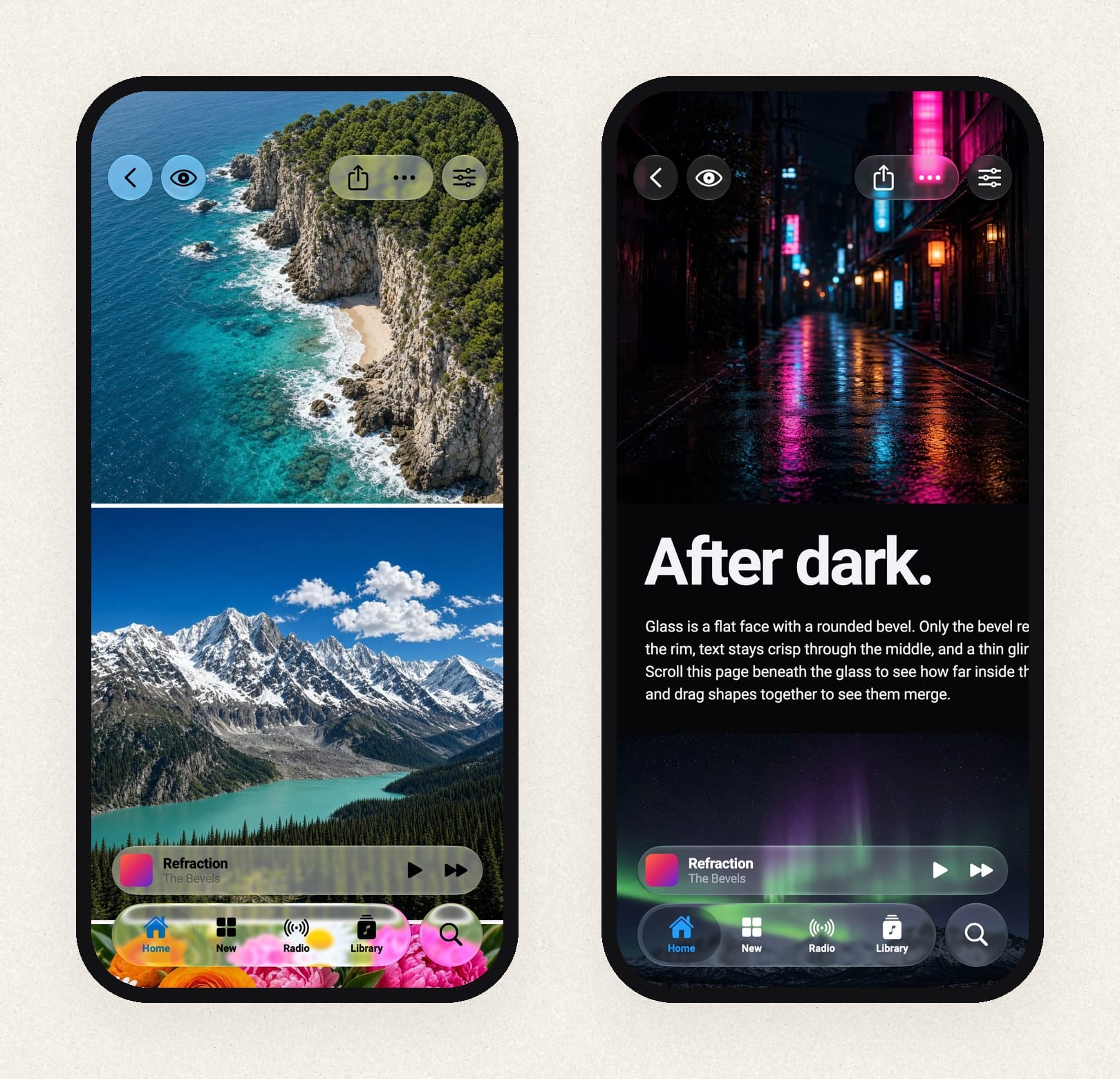
So why did we build this? First of all, it was a fun challenge, and we learned a lot. On top of that, pushing an effect this far shows where Flutter falls short, and that helps the ecosystem. It also runs on every platform, and you can take it in directions Apple's glass doesn't go.
Glass in two halves
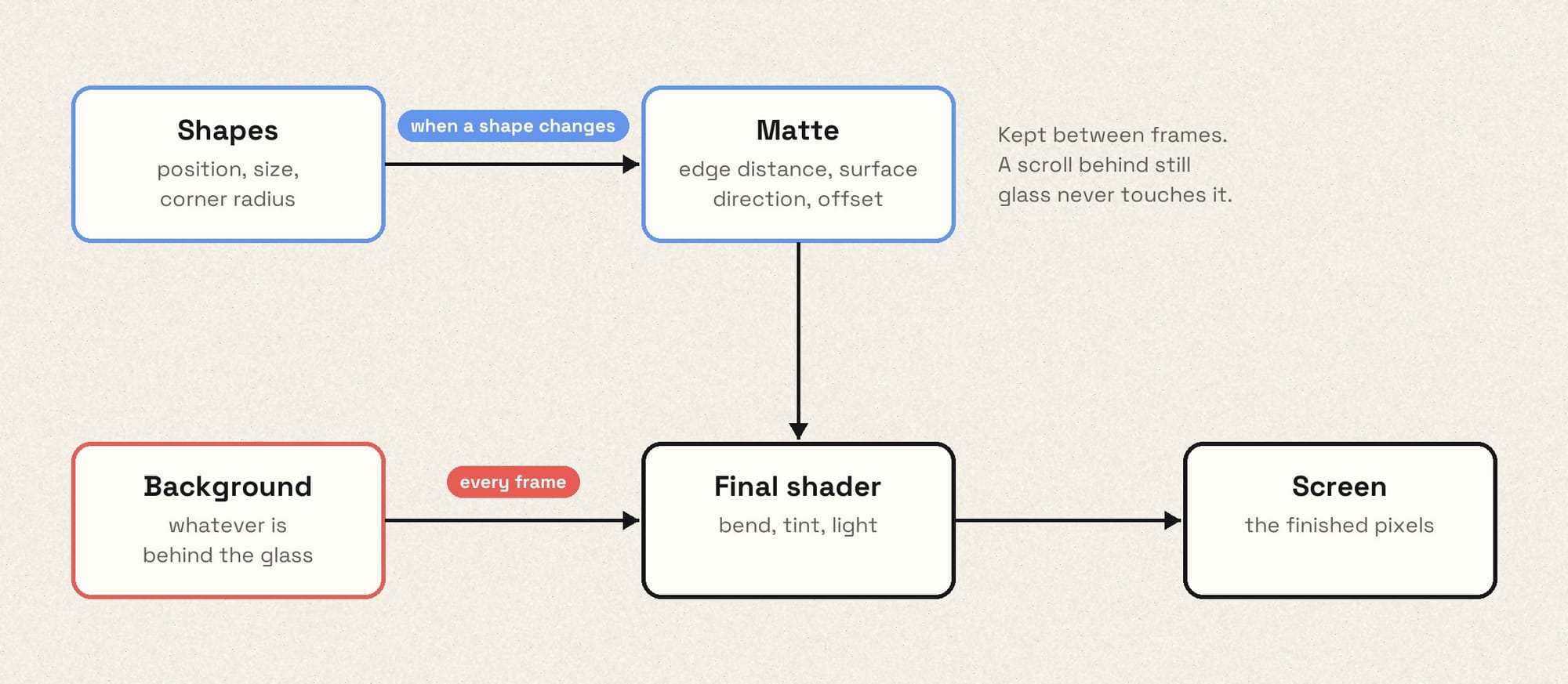
Rendering glass involves two kinds of work, and they change at very different
rates.
A disclaimer first: on iOS, we think the best way to get Liquid Glass in Flutter is Apple's own glass in a platform view. Apple renders it with access to the OS we'll never have, and it follows every retune for free. Platform views still have costs, but those are worth fixing in the engine rather than chasing a moving target in shaders.
So why did we build this? Because pushing an effect this far shows where Flutter falls short, and we'd like to see that fixed. It also runs on every platform, and you can take it in directions Apple's glass doesn't go.
The first is about the shape. How far is this pixel from the edge? Which
way does the surface tilt here, and how far should the background bend? None
of that changes unless the shape changes or resizes.
The second is about the background. Whatever sits behind the glass has to
be bent, tinted and lit, and that has to happen again every time the content
underneath changes, which during a scroll means every frame.
1.0 keeps the two apart. The shape work goes into a small texture we call the
matte, and the renderer keeps it until a shape changes. Every frame, one
final shader reads the matte, samples the background through it, and adds the
rim highlights, the dark outline and the inner shadow. When a list scrolls
behind a tab bar that isn't moving, the shape work doesn't run at all.
32 bits per pixel
The matte is an ordinary RGBA8 texture. That's 32 bits per pixel to describe the lens at that point.
Here's why precision matters. With 60 points of refraction on a 3× screen, the background can shift by up to about 180 physical pixels. Store that offset in 8 bits and each step is 0.7 pixels, which is coarse enough to show up as stair steps along the curved edge. So the matte packs a 12-bit surface direction and a 12-bit offset into three channels. The remaining channel stores the distance to the edge, on a curve that puts most of its precision right at the edge.
That packing has a downside we haven't solved: the values can't be smoothly interpolated, so the matte has to be rendered and read at full resolution. We suspect a smarter format exists. If you've built something like this, we'd like to hear about it.
The memory bug that wasn't in Dart
The old pipeline recorded the shapes into a picture and rasterized it into a brand-new image with Picture.toImageSync every time a shape changed. During a stretch animation, that was one new GPU texture per frame. We disposed each old image as soon as its replacement arrived, so on the Dart side everything looked correct.
But disposing an image doesn't free its memory right away. The engine defers releasing the texture to a later point, after the frames that might still use it are done. A sheet-sized matte at 3× is roughly 8–12 MB. At 120 frames per second, those not-yet-freed textures add up to hundreds of megabytes while the animation runs.
Moving to Flutter GPU didn't fix this by itself. A Flutter GPU texture is a small Dart object wrapping a large native allocation, it only reports the size of the small wrapper to the GC, and it has no dispose(). A matte replaced every frame looks like a few bytes of garbage. In one test on a Linux host we rendered 1,200 small mattes in a row, and 570–700 MB was still allocated when the loop finished. It was released after a few seconds of idle time.
liquid_glass_widgets, which vendors our old pipeline, limits the damage by rendering the matte at reduced resolution while a large shape animates, and at full resolution once it comes to rest. That's a sensible way to cap how big each leftover texture gets, but it still creates a new texture on every frame, and the glass changes quality when the animation stops. We tried lowering the matte resolution in our own renderer too, but with our matte format the interpolation errors showed up as visibly wrong refraction at the corners, where the curvature is highest.
We went the other way: stop creating textures. Each glass layer reuses its textures and draws into the same ones over and over, at full resolution. That took three attempts.
- Plain reuse. On the Pixel this fixed frame rate and UI-thread time. On the Mac, scenes that kept changing size got worse: retired textures of every size piled up faster than the GC released them, and our largest resize scene peaked at 2.4 GB, against 2.1 GB without reuse.
- Reuse with headroom. We made each texture a bit bigger than needed, so small size changes would fit without a new one. Some scenes improved. On the Mac, a full-width sheet resize went from 688 MB to 1,185 MB, because every texture that got replaced was now larger.
- Grow-only. A texture never shrinks while its layer lives. It grows in steps of about 1.5×, and the renderer only draws into the part it needs. A sheet moving between 45% and 90% of the screen keeps reusing one large texture instead of allocating dozens of different sizes.
The third design shipped. Compared with creating a new texture on every change (measured on the grow-only build from the end of September; the texture cache has been simplified since, and we haven't re-run the full suite on it yet):
| Scene | New texture per change | Grow-only reuse |
|---|---|---|
| Pixel 10, full-width sheet resize: peak memory | 647 MB | 321 MB |
| Pixel 10, full-width sheet resize: frame rate | 93 fps | 108 fps |
| Pixel 10, three stacked glass layers: frame rate | 70 fps | 119 fps |
| Pixel 10, button stretch: UI-thread paint time | 3.7 ms | 0.9 ms |
| M4 Max, large resize: peak memory | 2,119 MB | 610 MB |
These are whole-process numbers. The M4 Max row is our best case; on the other Mac scenes, peak memory dropped by between 0 and 20%.
How we benchmark
A screenshot can't tell you what an effect costs to run. To compare builds fairly, we built two benchmark runners.
The Pixel 10 runner installs several builds side by side and alternates between them, reversing the order each repetition so neither build always goes first. Before every run it waits until the phone has cooled to a fixed skin temperature. Each run records a Perfetto trace with power draw in milliwatts (GPU, CPU and memory, measured separately), GPU cycles per frame, UI-thread timings and memory use. A second runner on an M4 Max records frame timings, memory footprint and Metal GPU time. Each benchmark scene isolates one cost: a button stretch, a sheet resize, sixteen shapes merging, three stacked layers.
Some things we learned, with the caveat that all power numbers come from a single phone:
- Higher frame rates can raise power draw. With texture reuse, scenes that used to drop frames hit 120 fps. The phone renders more frames, so GPU power goes up. Per frame, the whole chip (GPU, CPU and memory together) used about 8% less energy on a button stretch and 20% less with three stacked layers. GPU energy per frame alone actually rose slightly. Judged on GPU milliwatts alone, the fix would have looked like a regression.
- Blur cost isn't proportional to blur size. Impeller picks a power-of-two downsample factor from the blur's size in device pixels, and the kernel ends up roughly the same width at each factor. Very small blurs, below roughly 5–6 device pixels, run at full resolution. So a blur just below one of those boundaries can shade several times more pixels than a noticeably larger one. That matches something we noticed on the Pixel, where a sigma-4 blur (half resolution there) cost more than a sigma-7 blur (quarter resolution), though we didn't record a careful A/B. So the presets nudge very light frost up to just past that point for the screen they're running on. A frost value you set yourself is left alone.
- Shader arithmetic tweaks didn't move power. Lower precision, fewer
powcalls and fewer texture reads in the final shader made no measurable difference on the Pixel. What does cost power is moving pixels around: every separate backdrop filter cost about 115 mW of GPU power on the Pixel, and the full-resolution final pass costs roughly as much again. That doesn't mean the shader is free, just that micro-optimizing its maths wasn't where the cost was. - Fake glass isn't free either.
FakeGlassskips the shape work and the refraction, but it still reads the background and blurs it, and those are usually the biggest costs. In a scripted 54-second session in a real production app (scrolling, tab switching, opening menus), the rewrite's fake glass drew about a third less power than the old renderer's, but only about 13% less than the rewrite's real glass. If you need a fallback that actually saves battery, use an opaque surface.
Not every result was clear. Metal GPU timings were sometimes too noisy to show whether a change helped, and the results files report those as inconclusive.
Matching Apple without fooling ourselves
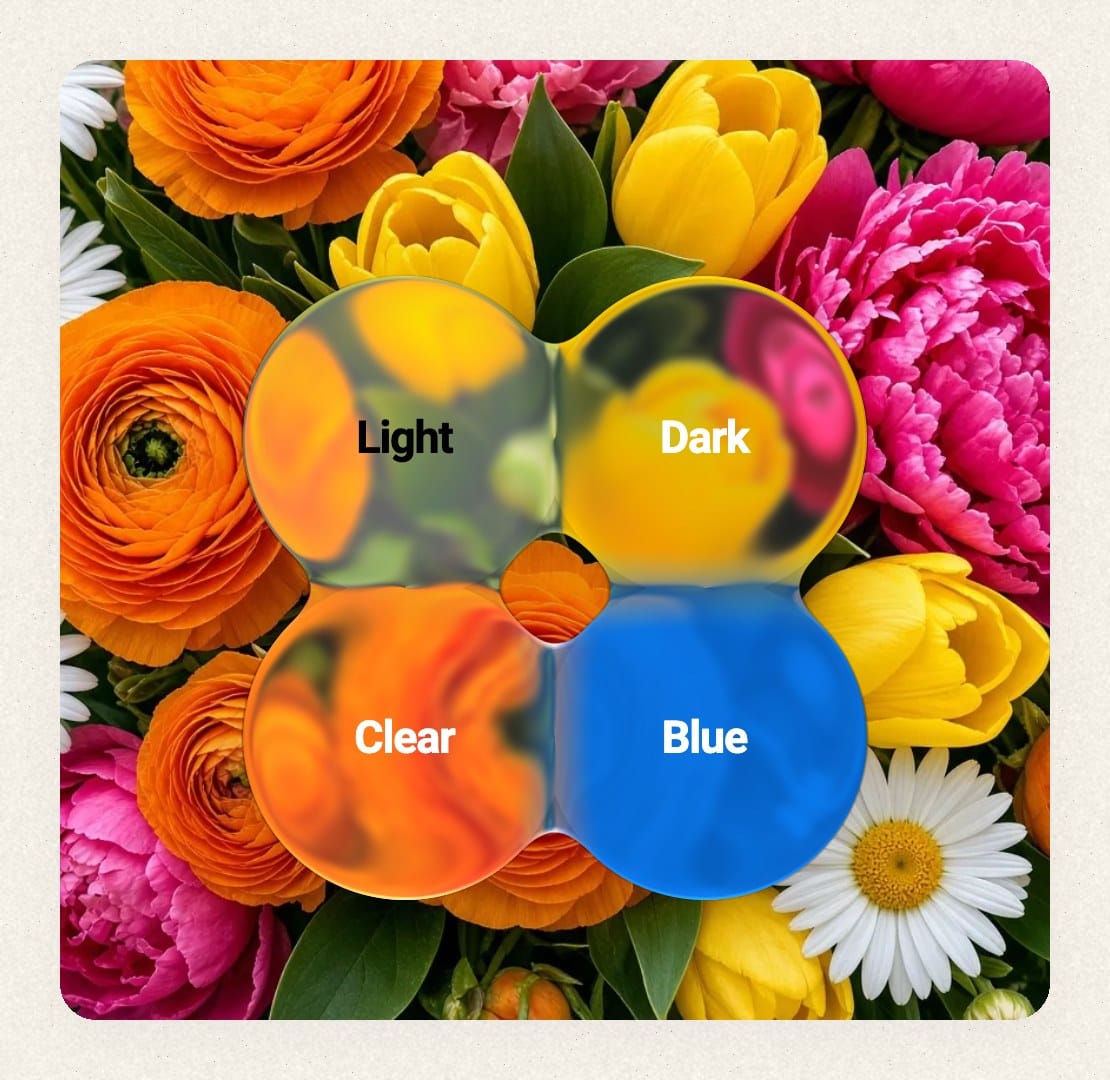
To check whether our glass looks like Apple's, we compare the two directly.
Each test scene is a JSON file that describes the canvas, the glass shapes and a set of backgrounds. A small SwiftUI app renders the scene with Apple's public glass APIs (.buttonStyle(.glass) and GlassEffectContainer) on a fixed iOS 27 simulator. It saves the median of three settled frames, together with the OS version, appearance and accessibility settings. A Flutter app renders the same JSON, and a set of Python scripts compares the two images.
Every scene is rendered over four backgrounds. Each background isolates different parts of the effect:
- a colour grid shows how the glass bends lines and shifts colour;
- a second grid checks that a fit still holds on a different pattern;
- pure black leaves only the glints and the glow from the surface;
- pure white leaves only the outline, the inner shadow and the drop shadow.
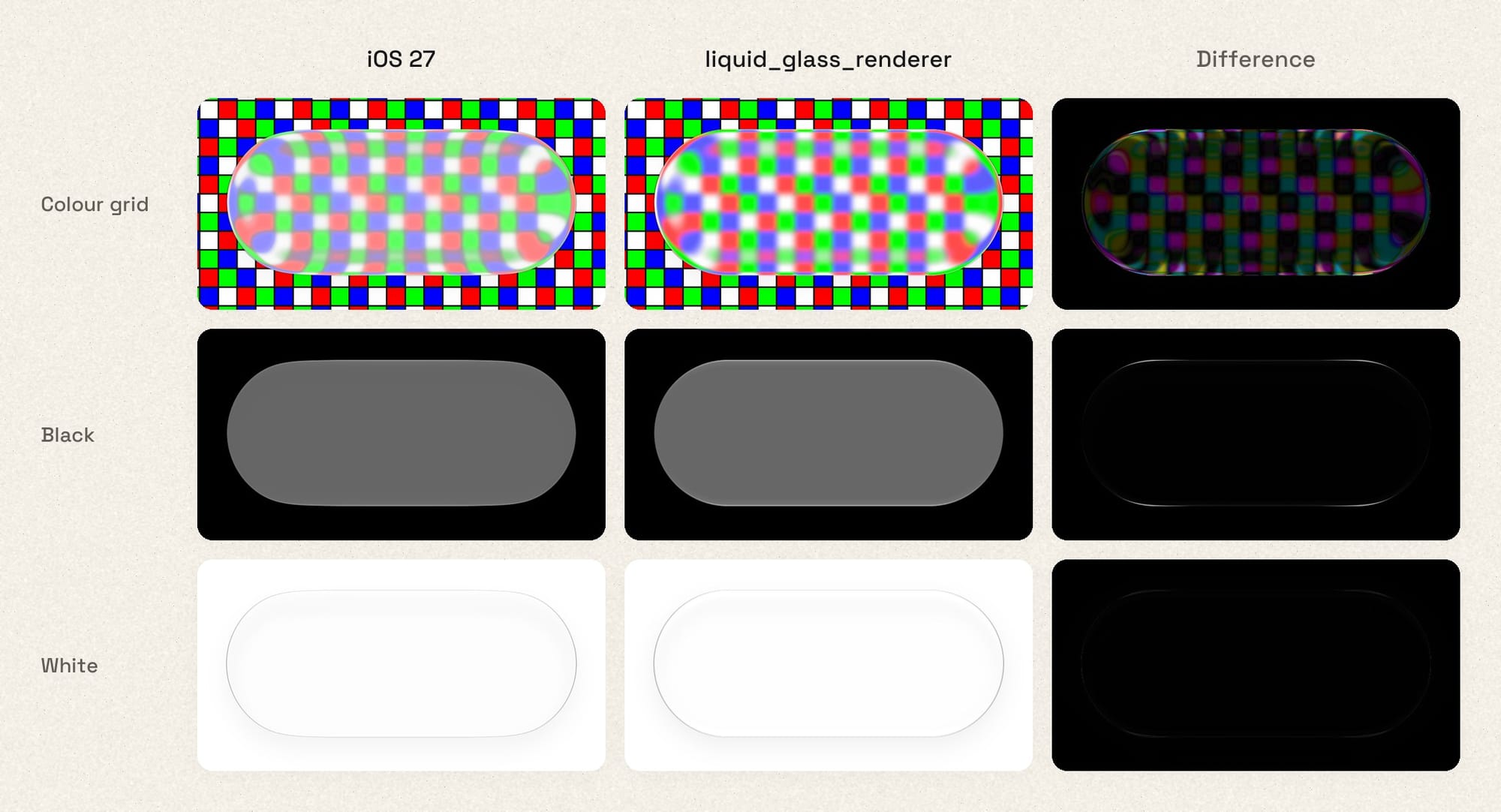
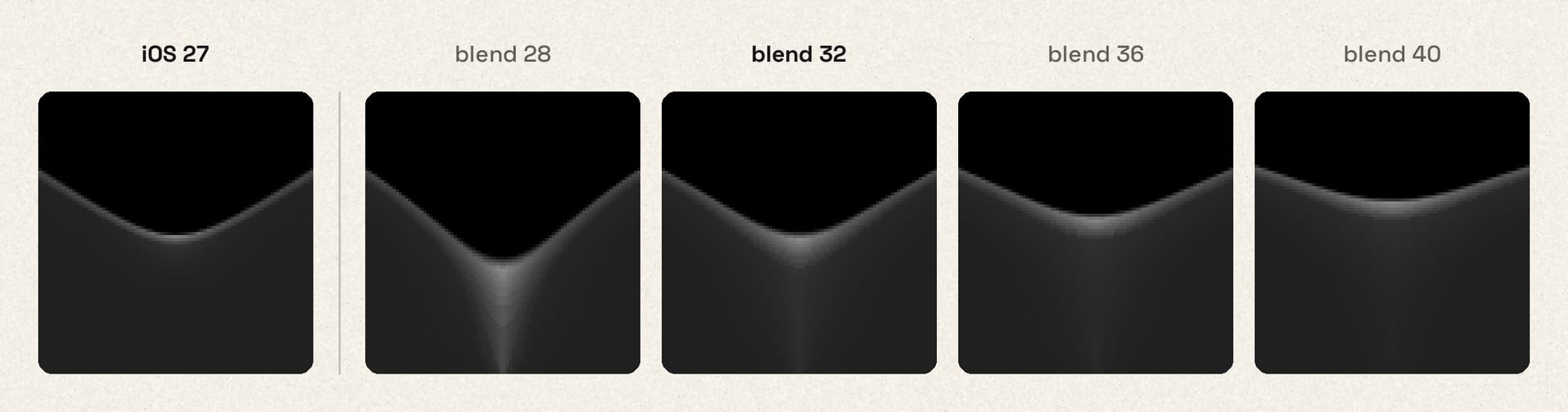
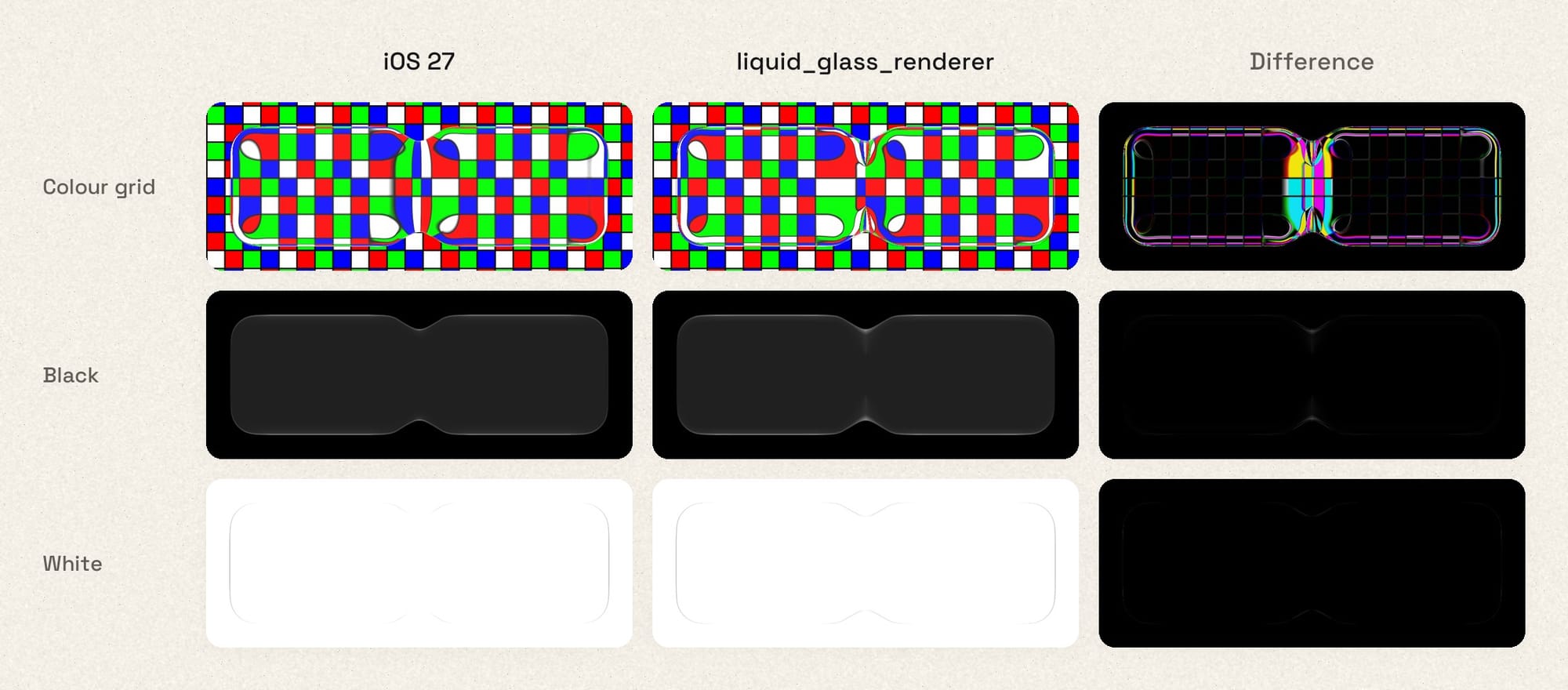
We don't publish an "Apple accuracy" percentage, because the pipeline can't produce a meaningful one. It's a regression tool. It shows whether a change moved us closer to Apple's rendering or further away, and in which part of the image.
The captures are SDR, so they don't show HDR. On a real iPhone, Apple's glint along the rim is brighter than SDR white. Ours can be too, but Flutter doesn't ask iOS for that extended brightness range by default, so you need to opt in: set FLTEnableWideGamut in Info.plist, and set wantsExtendedDynamicRangeContent on the Flutter view's CAMetalLayer in your app delegate. The README and the example app show both. On Android, Flutter renders into 8-bit surfaces, so the glint stays within SDR.
Render passes cost more than the shader
Much of what glass costs on the GPU happens outside the glass shader. On Impeller, a backdrop filter splits the current render pass: what has been drawn so far is stored to a texture, a new pass starts, and that texture is drawn back in as its starting point, all on the GPU. Any backdrop filter also makes the frame render offscreen and get copied to the screen at the end. A blur then adds passes of its own. A CPU profiler won't show any of this, and neither will the widget tree.
To understand it, we built impeeler, a small dev tool that records what Flutter draws and replays Impeller's decisions about where to split render passes. For each frame it reports how many passes there are, how large they are, and which widgets caused them. It predicts rather than profiles. On 14 small test scenes, its predicted pass structure matched real GPU traces on both Metal and the Pixel. It doesn't predict cost, and we haven't validated it on a physical iPhone.
Two patterns in 1.0 come from those measurements:
- Share the background where possible. All glass shapes in one layer sample a single shared copy of the background. Separate layers can share too, through Flutter's
BackdropGroup, which is opt-in. In impeeler's test scenes, two identical blurs sharing one background took 5 passes instead of 11. - Capture once when glass sits on glass. A tab bar's selection indicator has to refract the bar beneath it, so it can't use the same background copy as the bar.
LiquidGlassCapturepays for one full split, copies the background into a small, tightly cropped pass, and lets the glass inside split only that small pass. The bar draws first, then the indicator, which sees the finished bar. This helped in our example app (about 17% less GPU power) but barely moved the needle in a production app, and it only helps when the effects are small and close together.
What changes for you
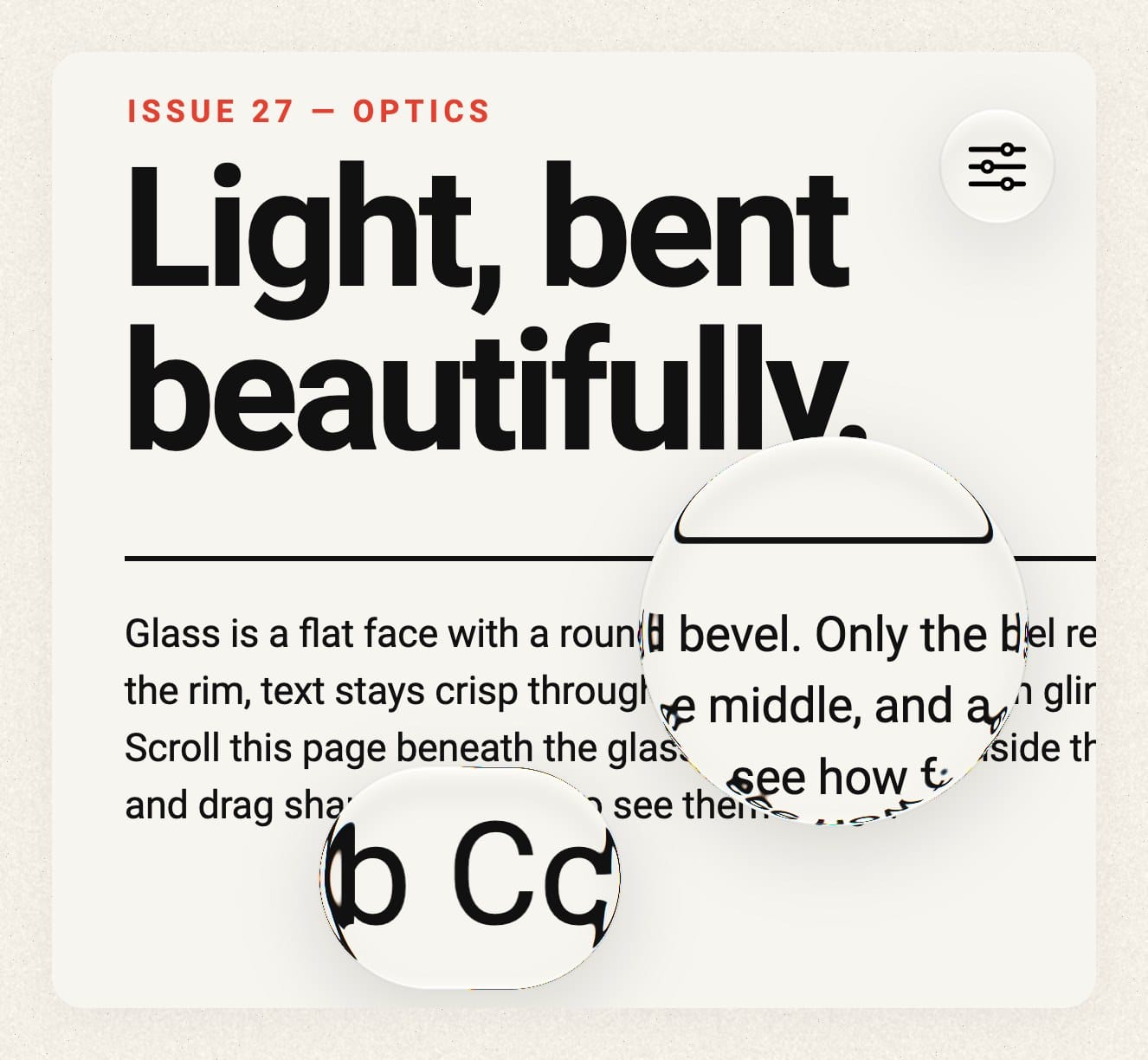
1.0 is a breaking release. Glassify, arbitrary shapes and child refraction are gone. The supported shapes are circles, ovals, rounded rectangles and rounded superellipses, currently up to 16 per layer. Children are drawn sharp on top of the glass instead of being refracted through it.
The full effect needs Flutter 3.47 with Impeller, and uses flutter_gpu, which is still a preview API that you have to enable: pass --enable-flutter-gpu to flutter run, or set FLTEnableFlutterGPU in Info.plist and the EnableFlutterGPU meta-data in AndroidManifest.xml (details in the README). Without it, and on Skia and web builds, the package falls back to FakeGlass. The license changed from MIT to Apache 2.0.
Where we'd love your help
Animating glass no longer piles up a texture per frame, composition costs are more predictable, and we can measure how far our rendering is from iOS. That measurement also shows how much is left. The refraction, the colour transfer, the rims and the glint where shapes merge all still differ from Apple's.
Please test it on your devices. Our numbers come from one Pixel 10 (PowerVR), one M4 Max and an iPhone 15. We have no data from Mali or Adreno GPUs, older iPhones, or low-memory devices. If the glass stutters, drains battery, or looks clearly wrong, please open an issue. The most useful reports include the device, a short screen recording, and ideally a scene file that reproduces it. The scenes, capture scripts and benchmark runners are all in the repository.
If you know GPUs, please tell us what we're missing. Some of it isn't ours to fix. Each glass layer copies the backdrop, blurs it, scales the blur back up, and copies the result twice more, and Flutter GPU can't take part in any of it. We're filing issues for these, alongside flutter/flutter#177133, which would let us mix sharp and blurred glass the way Apple seems to. If you see a better way around them, or a smarter matte format, we'd love to hear it.
1.0.0-dev.0 is a preview, and the API can still change before 1.0. Try it in your app, tell us what breaks, and help us make it faster.